Show of Hands, Live — the Room Counts Itself
Needs wifi. The same activity as the downloadable Show of Hands, with the counting done by the room instead of by a facilitator looking at raised arms. Project the question, everyone taps an option on their phone, and the split appears when you decide to show it — not before, because a bar chart that grows while people are still voting tells the undecided what to think. Nothing to install and no account.
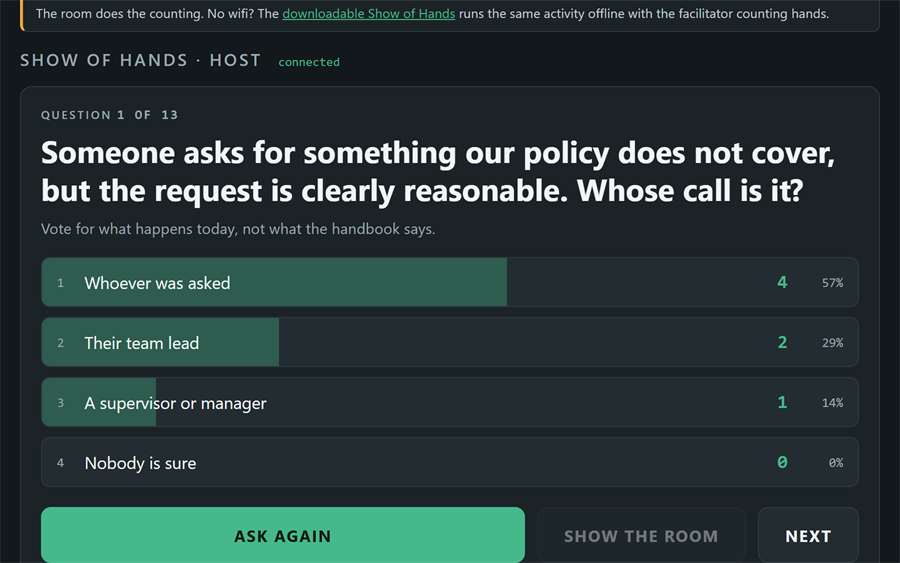
Open the host screenThe phone screen
Needs wifi. One of 3 tools here that run on a server instead of being a self-contained offline file. Everything else in the library is a file you keep. No wifi in the room? Use Show of Hands instead →
- Problem
- Asking a room to raise hands gets you a rough count and a lot of people watching each other before deciding, so what you measure is the confident half rather than the room.
- Who it helps
- Facilitators who want an honest read on a room that has wifi and phones — up to 60 people at once.
- In training
- Project the host screen, read the room code out, ask the question, and hold the count back until everyone is in. The split lands all at once, and the facilitator prompt underneath it is the actual activity.
- Skills shown
- Cloudflare Workers, Durable Objects, WebSocket hibernation, reconnect-safe session seats, real-time front end.
How to use it
The questions are not stored here — this page reads them from the downloadable Show of Hands, so editing that one file changes both. No wifi in the room? That same file runs the whole activity offline, with the facilitator counting hands.