Assessment Builder
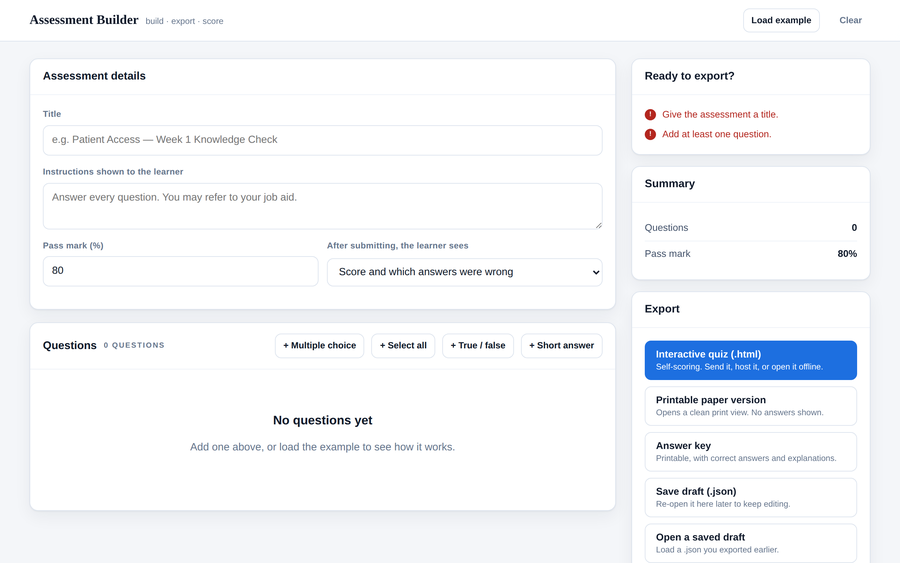
A builder that produces three finished artifacts from one draft: a self-scoring HTML quiz you can email, host, or open offline; a printable paper version with a name/date/score line; and a separate answer key with your explanations. Four question types — multiple choice, select-all, true/false, and short answer with a list of accepted responses. Live validation catches the things that actually break an assessment: no correct answer marked, fewer than two options, a multiple-choice question with two answers ticked. Work is kept in the browser, and drafts export as JSON so an assessment can be reopened and revised later.
- Problem
- Building an assessment usually means writing it twice — once as a document for printing and again inside whatever system will score it — and the two drift apart the moment anything changes.
- Who it helps
- Trainers, facilitators, and SMEs who need a knowledge check that can be sat online and handed out on paper, without a platform, a license, or an administrator.
- In training
- Draft the questions once. Export the interactive version for remote learners and the paper version for the room, and keep the answer key for yourself. The exported quiz is a single file with no dependencies — it works from a shared drive, an LMS upload, or an email attachment, online or off.
- Skills shown
- Front-end application design, state management without a framework, form and input handling, live validation with actionable messages, code generation (the export writes a second self-contained app), print stylesheets, file import/export via Blob and FileReader, localStorage persistence, accessible controls.
How to edit
- Fastest route: open it, click Load example, and edit from there — no code at all.
- Set a title, instructions, and pass mark at the top. Choose what a learner sees after submitting: score only, score plus which answers were wrong, or the full explanations.
- Add questions with the four buttons. Click a question to expand it; click the box beside an option to mark it correct.
- The Ready to export? panel tells you what is still missing and refuses nothing — warnings are advice, errors block export.
- Export the interactive quiz, the paper version, and the answer key. Save a
.jsondraft to reopen and revise it later. - To change the built-in example, open the file in a text editor and edit the
★ EDIT YOUR STARTING ASSESSMENT HERE ★block near the top of the script.