Jeopardy-Style Training Review Game
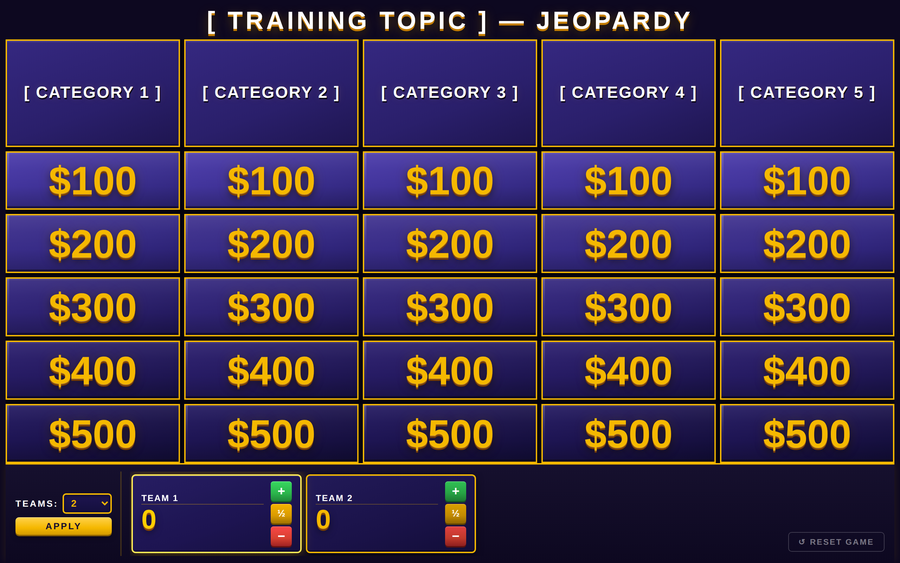
Editable in the browser and saveable. Click Edit this game, change the title, team names, team icons, every clue and answer — then Save my version writes a new .html file with your changes built into it, so they survive being renamed, moved, or emailed to another facilitator. A full HTML/CSS/JavaScript Jeopardy board trainers fill in with their own categories, clues, and answers — including team scoring, an on-screen timer, and a Final Jeopardy wager round. Ships as a blank, commented template.
- Problem
- End-of-module reviews go flat; learners disengage and retention drops.
- Who it helps
- Facilitators running onboarding, recertification, or process-update sessions.
- In training
- Open in a browser, set the number of teams (up to 10), reveal clues and answers, and close with a Final Jeopardy wager round — scores update live.
- Skills shown
- Front-end build, game-state logic, retrieval-practice design, trainer-editable template.
How to edit
- Right-click the file → “Open with” → a text editor.
- Scroll to the banner
★ EDIT YOUR GAME HERE ★near the top. - Each board block is one column — name the category, then write its five clues top to bottom ($100 → $500).
- Fill the Final Jeopardy category, clue, and answer. Save, then refresh the browser.