Beacon — Countdown Timers
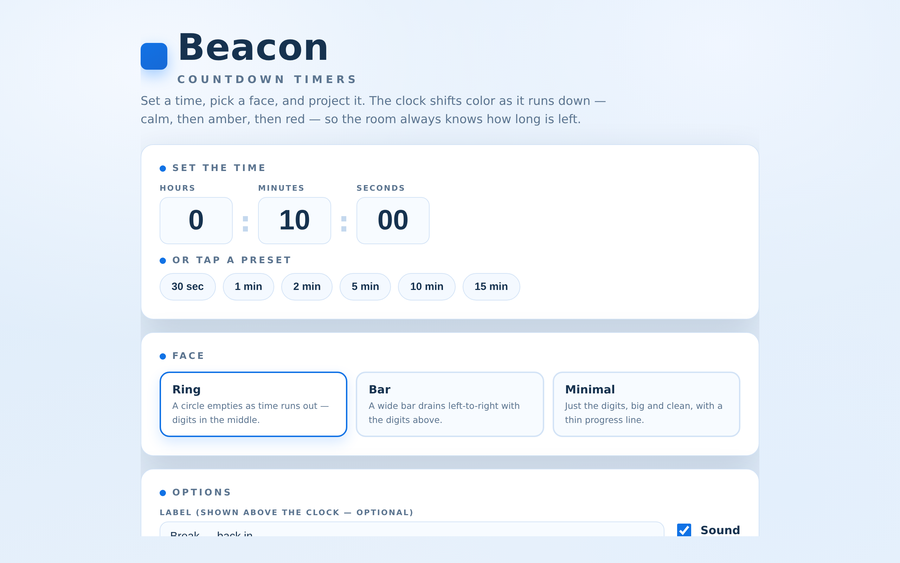
A countdown clock built for the front of the room. Set a custom time or tap a preset, then project it in one of three faces — a ring that empties, a bar that drains, or just big clean digits. The color shifts as the clock runs down (calm azure → amber → red) with an optional chime at the warning mark, quiet ticks in the final seconds, and an end alarm, so a glance tells the room how long is left. Start, pause, reset, and nudge a minute either way on the fly; add a label like “Break — back in” above the clock. Synthesized sound, fullscreen toggle, and a light “daylight” look that reads well on a projector.
- Problem
- Breaks and timed activities drift when the clock lives on the facilitator’s phone — the room can’t see it, and “just five more minutes” quietly becomes fifteen.
- Who it helps
- Facilitators and trainers timing breaks, think-time, and small-group activities on a shared screen — in the classroom or over a shared video call.
- In training
- Set the time or tap a preset, pick a face, and project it; the clock shifts color and sounds a chime as it nears zero, and you can pause, reset, or add and subtract a minute without leaving the screen.
- Skills shown
- Front-end build, accurate timing logic, progress-and-color state design, projector-first UI, synthesized audio cues, trainer-editable presets.
How to edit
- Right-click the file → “Open with” → a text editor.
- Scroll to the banner
★ EDIT YOUR TIMERS HERE ★near the top of the script. - Edit the
CONFIGobject: changepresets(each a{ label, secs }pair), thedefaultTime, the startingdefaultFaceanddefaultLabel. - Tune
warnAtandfinalAt(seconds remaining) to set when the clock turns amber then red, and toggle thesoundoptions. Save, then open in a browser — or just set everything live on the setup screen.